Shared Scanner and Radio Charging Lockers: What to Specify
Plan charging lockers for shared scanners and radios in Singapore: device fit, charging connections, shift handover, access records and support.
By Latchwork Published 5 min read
For a warehouse, workshop or operations team sharing scanners and two-way radios, the real question is whether the next shift can find a working device and whether a supervisor can tell who has one that is missing. A charging cabinet solves the storage and power part. It does not automatically solve issue-and-return accountability. Specify the devices and the handover first; choose the cabinet and access system second.
Start with the device pool, not the advertised bay count
List every device type, including any case, handle, battery pack, charging dock and cable that stays attached. Measure the largest complete assembly in width × depth × height. A bay that takes a bare scanner may not take its pistol grip or cradle, and a USB-C lead is not a substitute for a proprietary dock. Ask the equipment owner which charging method and output are approved for each model, then test one real unit in the proposed bay before signing off a drawing.
Count devices that must be available at the same time, spare units held back for faults and units returning at the end of the busiest shift. Do not simply divide total staff by the number of cabinets. A device that is out in the field cannot also be charging in its allocated cell; the operating schedule determines how many powered bays the site needs. Keep the device inventory and door numbering in the same schedule so a missing unit is identifiable without opening every bay.
Latchwork’s 16-bay keyed device charging model is a concrete starting point for compact shared devices: each bay is listed at 300 × 328 × 100 mm clear space with a 30 W USB-C cable. Its catalogue uses include scanners, radios and rugged handhelds. That is not a promise that every device fits or charges correctly. A radio with a charging cradle or a scanner with an unusual handle may call for a larger or custom compartment. The made-to-order phone and device cabinet range can be specified around the real item rather than forcing it into a phone-sized cell.
Decide whether staff or the locker manages handover
A keyed cabinet can be the right answer when a duty manager already issues a small, stable pool of devices and keeps the sign-out record. It secures and charges each unit with no platform subscription. But the key and any spreadsheet remain separate from the cabinet: the lock itself cannot say which person collected scanner 14. A touchscreen production charging unit is likewise self-contained; it should not be described as a Latchwork connected bank merely because it has electronics.
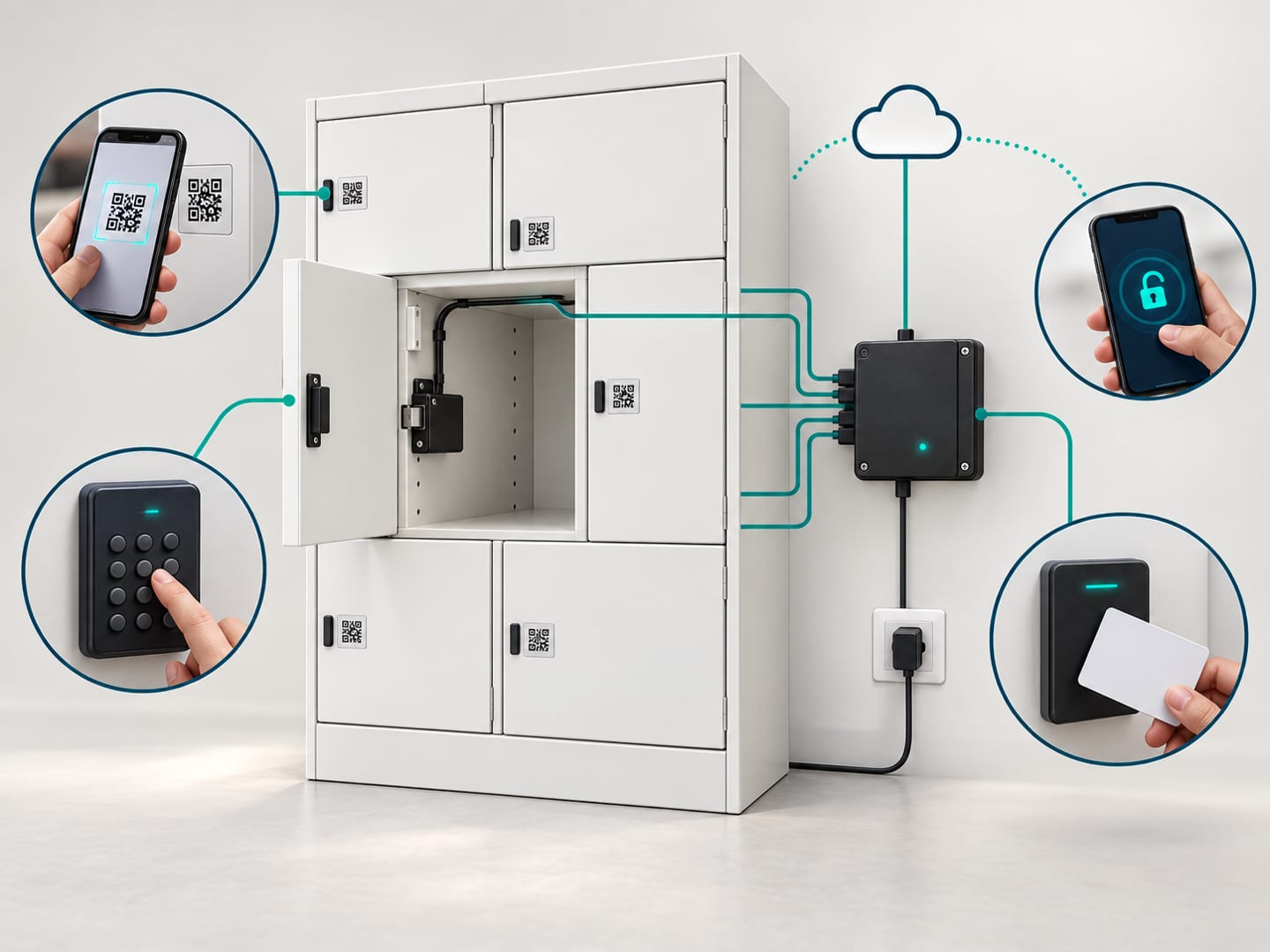
Ask for a project-specific connected bank when workers must collect and return devices without someone at a desk, when assignments change between shifts or when an opening record needs to be linked to an authorised person. Latchwork’s connected access can use QR, PIN, card or authorised remote release through a controller. The exact device-to-door mapping, return acknowledgement, exception alerts and charge-state rule must be scoped and demonstrated for the equipment being stored. Do not assume the cabinet can read battery percentage from every scanner or radio.
| Decision | Standard keyed charging cabinet | Project-specific connected charging bank |
|---|---|---|
| Who issues a device | Staff or a local key holder | Authorised user under the agreed access workflow |
| Opening record | Separate manual sign-out if the site needs one | Platform access events; define how the device itself is identified |
| Changing access | Reissue or recover keys locally | Change authorised users centrally |
| Charging connection | Use the stated cable and bay dimensions | Specify the cable, dock and monitoring with the actual devices |
| Best fit | Stable, staff-run device pool | Unattended, changing or accountable pool |
The access options show why a standalone lock and a connected controller are different purchases. Choose the simpler route when staff already manage every handover reliably. Pay for the connected route only when it replaces a real issue-and-return process, not because “smart” sounds better on the purchase order.
Specify power and service access as part of the bay
The proposal should list the charging connector, output and cable route for each device type. Latchwork’s standard 16-bay keyed model lists one 13 A supply for the unit, but a row of cabinets is not one unit; confirm the combined site load and available socket positions before ordering. For a custom bank, ask how a technician reaches a failed charger or cable without taking the whole device pool out of service. Keep ventilation openings clear and define where damaged devices or batteries are quarantined under the site’s own operating procedure; a charging cell is not a repair or disposal station.
Make the return routine explicit. Does a user put a device back in its numbered bay, scan the device identifier, report a fault, or all three? Who checks that a returned device is actually charging? What happens if a worker has not returned a unit before the next shift? Those answers may be a simple staff checklist on a keyed cabinet or software rules on a connected one. Neither approach removes the need for a named person to maintain the asset list and follow up on exceptions.
Test a full shift handover before acceptance
Use the actual scanner and radio models, not a phone borrowed for a demonstration. Confirm the largest item fits with its case and dock, the connector charges it, the cable does not prevent the door closing, and a supervisor can open the compartment when normal access fails. Then walk through issue, return, a flat battery, a lost credential and a device that is not returned. On a connected proposal, verify the agreed user and device records and any charge-state rule with test accounts; never infer those from a generic cabinet demo.
Send Latchwork the device inventory, photos and dimensions of the largest units, charging specifications, busiest-shift count, site power and your preferred handover process through the quotation form. Ask for a standard keyed option where it fits and a separately scoped connected option only if the operation needs unattended accountability. A small physical and workflow trial is cheaper than installing a bank whose doors fit the brochure but not the devices.
Where this applies
Quick answer: How should a Singapore site specify charging lockers for shared scanners and radios?
A Singapore site should specify shared scanner and radio charging lockers from the actual devices and shift workflow, not a generic bay count. Measure each device with its case and charging dock, confirm the connector and charging requirement, and count how many must be ready at the same time. A keyed cabinet can charge and secure a stable pool when staff manage sign-out. If the site needs unattended issue, named-user accountability or centrally managed returns, request a connected, project-specific bank and test the complete handover before ordering.
- Measure
- Device, case and charging dock
- Count
- Peak devices between shifts
- Keyed option
- Local issue and return
- Connected option
- Project-specific workflow
Questions people also ask
Can a standard laptop charging locker hold a barcode scanner?
A standard device charging locker may hold a barcode scanner if the complete device, case and connector fit its clear bay and its charging output matches the device. Latchwork lists scanners and radios among uses for its 16-bay keyed model, but the buyer should test the actual hardware rather than assume every scanner dock uses USB-C.
Does a keyed charging cabinet record who took each device?
A keyed charging cabinet does not create a named digital issue-and-return log. Staff can maintain a separate sign-out process, but an automatically recorded handover requires a project-specific connected access workflow rather than a standard keyed charging model.
Will a connected locker know whether every scanner is fully charged?
A connected charging locker should not be assumed to know an individual device’s battery percentage. The site and supplier must agree which charge-state signal the device or dock can provide, what the cabinet can monitor, and what rule prevents an unready unit being issued; demonstrate that combination with the actual equipment.
How many sockets should a bank of device charging lockers have?
A charging-locker proposal should identify the supply for each selected unit and the combined load of the planned installation. Latchwork’s listed 16-bay keyed device cabinet uses one standard 13 A socket per unit, but a multi-unit or custom connected layout needs a site-specific electrical and cable-routing review before it is approved.
What should be checked at handover?
A shared-device charging locker should be accepted only after a real scanner or radio fits each intended bay, charges through the specified connection, can be issued and returned under the agreed access process, and can be recovered by authorised staff. A connected proposal should also demonstrate the agreed user, device and exception records.